Operating System Stack and Kernel Extensions | Introduction to eBPF
Operating System Stack and Kernel Extensions
To understand what eBPF does, let's first get everybody on the same page and describe the logical components of a server or computer—the physical, kernel, and user layers.
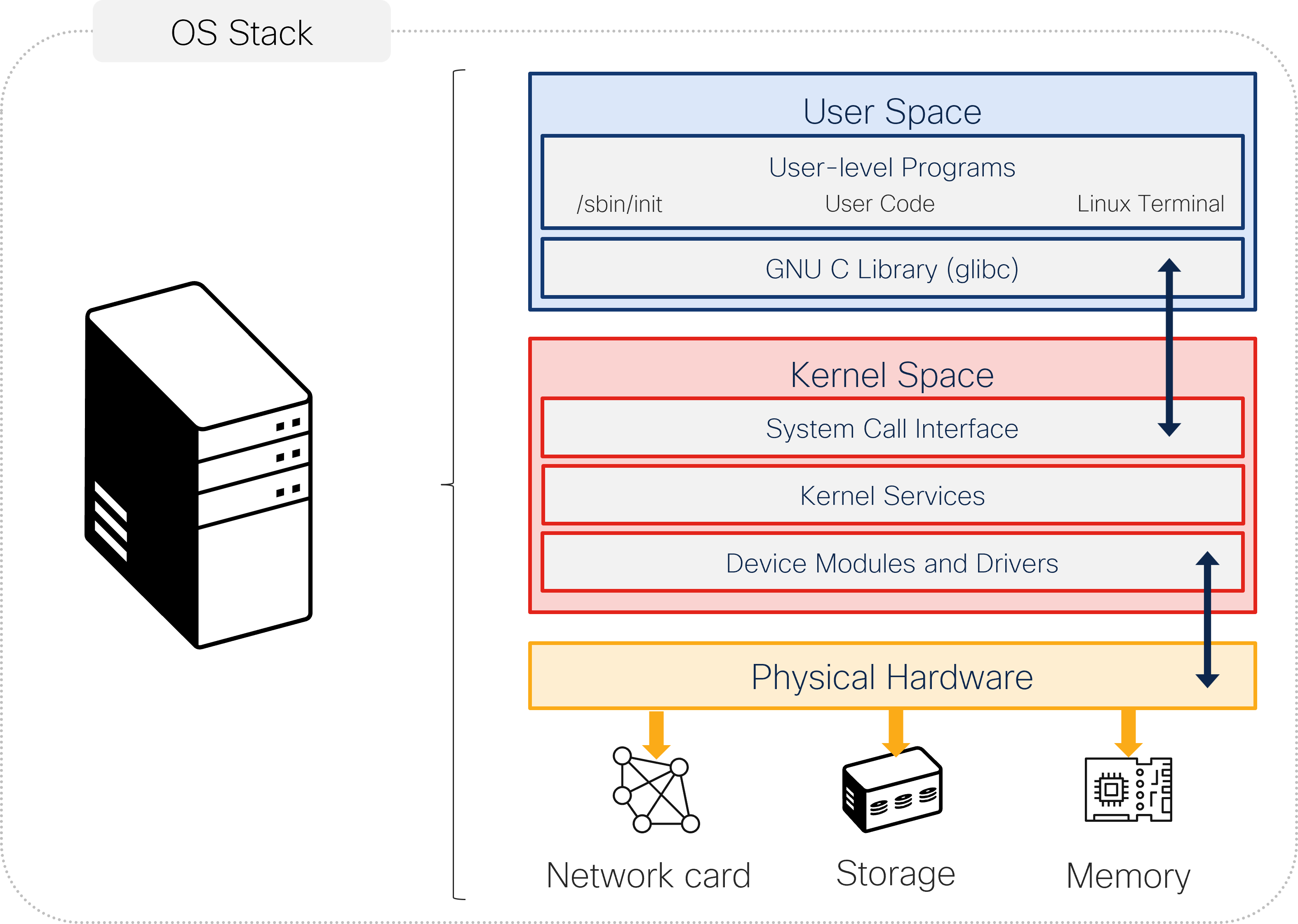
Physical Layer
This layer is where you will find all the hardware of the computer or server. This hardware does all the basic work of processing data, storing information, and connecting with other devices. The physical layer has the following components:
- CPU: The primary component of a computer that performs most of the processing inside the computer
- Memory: Stores information, such as data and programs, for immediate use in the computer
- Devices: Peripherals such as disks, keyboards, and network interfaces
Kernel Layer
This layer is the core of the operating system and sits between the hardware and the applications that you run. It manages system resources and handles requests from applications. The kernel layer has the following components:
- Device modules and drivers: Special programs that help the kernel talk to and control the hardware devices
- Kernel services: The main jobs that the kernel does, including memory management and keeping track of running programs
- System call interface: How the programs in the user space ask the kernel to perform actions on their behalf
User Layer
This layer is where you find all the software that you are using. The software or applications need to talk to the kernel to get things done, like opening a file or connecting to the internet. The user layer has the following components:
- User-level programs: Applications that you use, like web browser, text editor, or games; /sbin/init, user code, and the Linux terminal are examples of important user-level programs that start the system, run the code, and let you interact with the systems through commands
- GNU C library (glibc): A set of tools and functions that help applications communicate with the kernel
How They Work Together
The applications need the ability to talk to all physical components in the server. However, it would be rather complex for any application to know how to directly address different types of network cards, disks, and so on. This is where the kernel comes in. It is the responsibility of the kernel to interpret system calls (requests) from the applications. Applications just need to worry about talking to the kernel, and the kernel is responsible for talking to the physical components.
The kernel is designed as a very stable piece of software because a lot of components rely on it. On the other hand, extending the kernel's functionality is essential for several reasons, including hardware support, performance optimization, observability, and implementing security.
Using Kernel Modules to Extend Linux Kernel Functionality
Loadable kernel modules (LKMs) are chunks of code that can be dynamically loaded into the base Linux kernel to extend its functionality without needing to reboot the system. LKMs are great for adding and removing kernel extensions such as device drivers and file systems.
However, using LKMs to extend kernel functionality does have a number of drawbacks:
- Complexity: Writing and maintaining LKMs can be complex and error-prone. Also, writing LKMs requires deep knowledge of kernel internals and can lead to stability issues if not implemented correctly.
- Security risks: You need to run LKMs with full privileges, meaning that a bug or vulnerability can compromise the entire system.
- Maintenance: You will need to update LKMs every time there is an upgrade to the kernel. This requirement can introduce significant workload to the team and hinder innovation.
Keep going!
Introduction to eBPF
28% complete